
Historical lesson
This material predates the 2026 course and may use older WPILib, vendor APIs, team wrappers, and game rules. Its original version is not verified here. Do not copy its robot code into a 2026 project without migration and mentor review. Start with the 2026 subsystem lesson.
Command Groups
(More information here)
Now that we've planned and written out our drivetrain trajectories, it's time to fuse those together with our robot's other capabilities.
So far, we've only gone through writing individual commands and their respective subsystems. However, what if we want to make more complex robot actions? One might want to run multiple commands simultaneously on a single button press. This is where a command group comes in.
As the name indicates, command groups are combinations or collections of multiple commands. Thus, what they really do is allow multiple subsystems to be run synchronously.
Command groups compose multiple commands into one whole, allowing a program to be kept simple and clean. Overall, they allow for reduction in code complexity. One thing to note is that command groups themselves are commands--this means that command groups can contain other command groups as components, and so on.
Command groups are essential for autonomous routines, really making them a lot easier to program. Remember 254's four cube auto? Although they write a lot of their own custom controls and don't fully rely on WPILib's helper classes, their performance is still a perfect example of running subsystems concurrently, especially how the elevator is raised and lowered so smoothly together with the intake.
The command-based library supports four basic types of command groups: Sequential, Parallel, ParallelRace, and ParallelDeadline. Types ParallelRace and ParallelDeadline are similar to Parallel, but each have their own unique qualities.
Sequential
A SequentialCommandGroup allows for commands to be run in a defined sequence. The program moves forward in the sequence one-by-one as each command finishes, until the sequence is complete. Therefore, it is imperative that each command in the list is able to actually end--otherwise, the sequence will stop prematurely.
Parallel
The ParallelCommandGroup allows for commands within it to run simultaneously. This group ends once all commands inside have finished.
ParallelRace
First, the ParallelRaceGroup runs its commands concurrently, just like the ParallelCommandGroup. However, the ParallelRaceGroup ends when any command inside finishes; all other commands still running are interrupted at that time.
ParallelDeadline
A ParallelDeadlineGroup is almost exactly like the ParallelRaceGroup, except it ends when a specific command is complete (the "deadline" or stopping point). Like before, all other commands are interrupted when the group reaches the deadline (if they haven't ended already).
Creating Command Groups
To create a command group, simply subclass one of the built-in WPILib command group classes described above. Let's go through an example with an intake and drivetrain in 2019's Destination: Deep Space.
...

public class ShipFrontCommand extends SequentialCommandGroup {

    public ShipFrontCommand(Drivetrain drivetrain, Intake intake) {
        addCommands(
            new DriveDistanceCommand(autoDistance, drive),
            new EjectCargoCommand(intake),
            new TurnLeftCommand(90, drivetrain) // degrees
        );
    }
}
This is a SequentialCommandGroup that moves the robot forward a certain distance towards the nose of the cargo ship, ejects the pre-loaded cargo, and then turns left. Of course, this assumes that DriveDistanceCommand, TurnLeftCommand, and their respective parameters are defined, and that the necessary import statements are present. The class itself is the command group, and inside the constructor, we use addCommands() to add the appropriate commands, in sequence.
Note
A command group would be bound to controller input in the same way an individual command would.
Warning
The robot program will throw an error if a command is scheduled both independently and from within a command group at the same time. For instance, in the example above, it would be problematic if the ShipFrontCommand command group was called at the same time as TurnLeftCommand, since TurnLeftCommand would end up being called from multiple places at once.
Now let's take a look at a more complex example, taken from 1257's robot code for 2020's Infinite Recharge.
public class TrajDriveAndShoot extends ParallelDeadlineGroup {

    public TrajDriveAndShoot(Drivetrain drivetrain, Indexer indexer, Shooter shooter, Trajectory trajectory, Intake intake) {
        super(new SequentialCommandGroup(
                new SetRobotPoseCommand(drivetrain, trajectory.getInitialPose()),
                new DriveTrajectoryCommand(drivetrain, trajectory),
                (new IndexerShootCommand(indexer, shooter, () -> true)).withTimeout(INDEXER_DUMP_TIME)),
            new ShooterPIDCommand(shooter)
        );
    }
}
A few things:
- IMPORTANT: The first command passed into a
ParallelDeadlineGroupis automatically set as the deadline (i.e. first parameter = deadline). - We subclass
ParallelDeadlineGroup. - A
SequentialCommandGroupis passed in as a command itself (perfectly valid!) to run both the drivetrain and indexer commands.- This inner group acts as the deadline of the outer group.
- During all this,
ShooterPIDCommandis run the entire time to keep the shooter wheel spinning.
Note that addCommands() is nowhere to be found. This is because we wanted to be able to call TrajDriveAndShoot itself as a ParallelDeadlineGroup in our other routines. Otherwise, we would've had to write out TrajDriveAndShoot's inner commands in every routine, which wouldn't be very efficient.
We use super() as a way to grab ParallelDeadlineGroup's constructor since we are subclassing it, and then pass in the appropriate commands. This allows us to reference TrajDriveAndShoot as a ParallelDeadlineGroup object, and use it in the other routines.
Timeouts
Timeouts are a nice convenience feature provided by WPILib that allows us to decorate our commands with a time limit (see the full list of convenience features here). One application of timeouts would be in autonomous.
Most of the commands we write for our subsystems do not have a specific end condition, hence why isFinished() in the commands always returns false. We don't specify anything in isFinished() since our commands are bound to buttons and triggers, and start/end based off of those controller inputs.
So, if we want to use our teleop commands in autonomous, we can use .withTimeout(VALUE), where VALUE is a time limit in seconds.
If we look at the example above, we see .withTimeout(INDEXER_DUMP_TIME). This means that IndexerShootCommand() will be run for INDEXER_DUMP_TIMEs value in seconds, launching the power cells as a result.
Trajectory Auto
We've gone through two command group examples--now let's get into auto routines that include drivetrain trajectories (from 1257's 2020 auto):
public class TrajTopTrenchAuto extends SequentialCommandGroup {

    public TrajTopTrenchAuto(Drivetrain drivetrain, Indexer indexer, Shooter shooter, Intake intake) {

        Trajectory topTrench1 = Trajectories.getTrajectory("Top-Power");
        Trajectory topTrench2 = Trajectories.getTrajectory("Power-Trench");

        addCommands(new TrajDriveAndShoot(drivetrain, indexer, shooter, topTrench1, intake),
            new DriveTrajectoryCommand(drivetrain, topTrench2));
    }

}
Here's a breakdown:
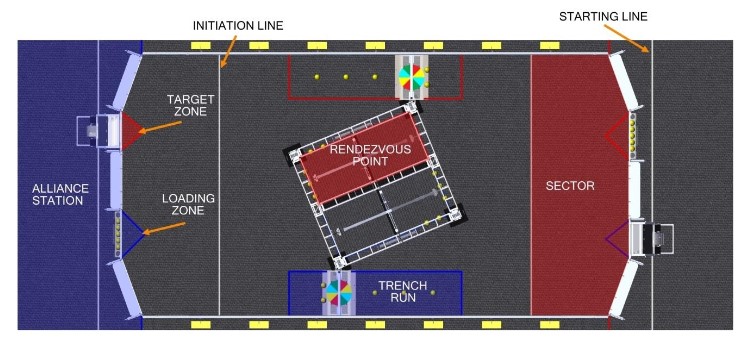
- We use our
Trajectories.javageneration class and grab two separate paths, one for driving up to the target zone ("Top-Power"), and one for going from the power port to the trench ("Power-Trench"; red trench from this diagram's view). - The "Top-Power" trajectory is passed into
TrajDriveAndShoot, which is from the previous example; this allows the robot to shoot power cells while following the trajectory. - Then,
DriveTrajectoryCommandhas the drivetrain follow the secondary path to the trench. - Here,
addCommands()is used so that the inner commands will actually be scheduled, or run by the CommandScheduler.- This isn't like before, where we were creating a command group as an independent class to be used elsewhere.
The main takeaway here: the bulk of the work is done in Trajectories.java and the trajectory-following code. This command group is simply what brings everything together in a cohesive manner.
We would use the same principles to program the other robot routines (because of varying trajectories), therefore completing our autonomous!
Explore 1257's 2020 autos here.