
Folders & Files in src/
Let's view the structure of src/.
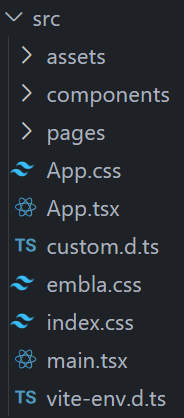
You should see three primary folders: assets/, components/, and pages/. As you should expect, assets/ mostly contains images, components/ mostly contains the custom React components I developed, and pages/ organizes the components into standalone pages on the website.
pages/
If you take a look at App.tsx, you'll see how the different links on the website correspond to a certain page. For example, Home.tsx is displayed when you directly visit frc1257.org, Leadership.tsx is displayed when you visit frc1257.org/leadership, etc.
const router = createBrowserRouter([
  {
    element: <Layout />,
    errorElement: <NotFound />,
    children: [
      {
        path: "/",
        element: <Home />,
      },
      {
        path: "info",
        element: <Info />,
      },
      {
        path: "awards",
        element: <Awards />,
      },
      {
        path: "support",
        element: <Support />,
      },
      {
        path: "sponsors",
        element: <Sponsors />,
      },
      {
        path: "leadership",
        element: <Leadership />,
      },
      {
        path: "donate",
        element: <Donate />,
      },
      {
        path: "linktree",
        element: <LinkTree />,
      },
      {
        path: "gallery",
        element: <Gallery />,
      },
      {
        path: "outreach/*",
        element: <OutreachRouter />,
      },
    ],
  },
]);
Outreach Pages
You'll notice that the pages for outreach actually have their own separate router in OutreachRouter.tsx. This is because several pages fall under the ../outreach/.. subdirectory. The files associated with these pages can be found in pages/outreachPages/.
const OutreachRouter = () => {
  return (
    <Routes>
      <Route path="" element={<Outreach />} />
      <Route path="school" element={<SchoolOutreach />} />
      <Route path="local/*" element={<LocalOutreachRouter />} />
      <Route path="mar/*" element={<MAROutreachRouter />} />
      <Route path="first" element={<FIRSTOutreach />} />
    </Routes>
  );
};
Image Storage
You'll notice that images are stored in both components/ and assets/.
assets/ mainly contains three sets of images: imgGallery/, leadershipImages, and sponsors/. imgGallery/ images are displayed as a masonry layout on the Gallery.tsx page. leadershipImages are displayed on the Leadership.tsx page. sponsors/ are displayed on the Sponsors.tsx page.
components/ contains more miscellaneous images. For example, images used on the Outreach pages are stored in outreach/. backgrounds/ contain the galaxy backgrounds used in the navbar. robots/ contains robot pictures from the past but is not currently displayed anywhere.