
Archived historical lesson. Original version and vendor dependencies are not verified. Team-specific wrappers, class names and APIs may be obsolete. Use the 2026 beginner path for current lessons. Examples below are preserved as historical context and are not validated robot code.
Making Commands (Roller Intake)
With our subsystem file finished and filled with constants, it is now time to go onto the next topic: commands.
What are commands?
Each action that the robot can perform should be represented as a command. The purpose of a command is to make the robot actually complete an action. As a result, there is usually one command per subsystem state. Each subsystem will always have a command running on it, whether it be a default neutral command, or a command called manually.
The original historical roller-intake flowchart is no longer publicly accessible. The following separately created diagram illustrates a different 2026 scoring command, not the old roller-intake design. In both cases, bindings schedule commands that direct subsystem behavior; consult the code for the actual implementation.
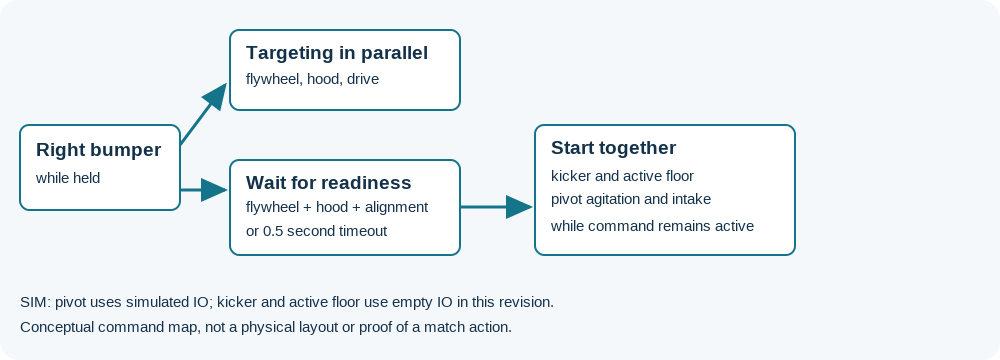
Read the 2026 code walkthrough for the source, sequence and simulation limitations.
This historical section explains how commands were intended to modify the roller intake subsystem state.
Command File Format
We'll continue working with a roller intake. Below, you'll find the basic skeleton of a command.
One thing you should note is the naming of the command: first comes the name of the subsystem, then the action, and then the word Command. This way, we can keep our class names consistent while also making them easy to organize / find. This creates some interesting command names, as you will see with RollerIntake + Intake + Command = RollerIntakeIntakeCommand.
Our class will extend CommandBase, which essentially allows our command to be recognized by WPILib's command-based framework.
package frc.robot.commands.rollerintake;

import edu.wpi.first.wpilibj2.command.CommandBase;
import frc.robot.subsystems.RollerIntake;

public class RollerIntakeIntakeCommand extends CommandBase {

    public RollerIntakeIntakeCommand()

    }

    @Override
    public void initialize() {

    }

    @Override
    public void execute() {

    }

    @Override
    public void end(boolean interrupted) {

    }

    @Override
    public boolean isFinished() {

    }
}
Now we will briefly look over the purpose of the constructor and each function.
-
RollerIntakeIntakeCommand()- This is the constructor for the command. All this deals with is defining the intake for usage in the subsequent functions. -
initialize()- This function is run once when the command is first scheduled. However, if a command is run once and then is restarted, this will run again. For this subsystem, this won't really do anything since we want to constantly update the state of our roller intake, not just set it once and risk something changing it again later. For other commands such as setting a subsystem to a certain position, this may have functionality to do such an action. -
One important distinction can be made between the constructor and the
initialize()function. The constructor is run once when the program first starts, no matter whether or not the command is actually scheduled. Theinitialize()function is run once every time the command is scheduled. -
execute()- This function runs constantly at 50 Hz (once per period of 20 ms) while the command is scheduled. We will use this here to constantly call -
end(boolean interrupted)- The end function is run once when the command ends, whetherisFinished()returned true, or if the command was interrupted. It is usually used for reverting the subsystem back to the default state although occasionally, it is also used for other things like setting variables to certain values. -
isFinished()- This function is called afterexecute()and is in charge of setting the conditions for which the command should stop running. If this returns true, thenend()is called, and the command is unscheduled.
Roller Intake Functionality
Now that we have the skeleton of the command out of the way, we can start programming the command.
Initializing the Command
public class RollerIntakeIntakeCommand extends CommandBase {

    private RollerIntake rollerIntake;

    public RollerIntakeIntakeCommand(RollerIntake rollerIntake) {
        this.rollerIntake = rollerIntake;

        addRequirements(rollerIntake);
    }

    @Override
    public void initialize() {

    }
-
We first declare a variable for the subsystem we will be using so that we can send instructions to it when this command is being processed by WPILib
-
Then, we define the constructor as taking in the subsystem that will be adjusted by the command.
-
After that, we define the requirements of the command with
addRequirements(rollerIntake). The purpose ofaddRequirements()is for theCommandSchedulerto know which subsystems are being used for commands. If the scheduler sees two commands running that both have theRollerIntakesubsystem as a requirement, it will cancel the earlier command in favor of the new one. -
Lastly, there is the
initialize()function. There is currently nothing inside of it as this is a basic command. Though it is still not deleted in case there will be a future need of it. It is generally a good idea not to delete these functions from our class even if they are unused because we may find that we need to add stuff for debugging.
Changing The Subsystem State
    @Override
    public void initialize() {
    }

    @Override
    public void execute() {
        rollerIntake.intake();
    }
In execute(), there is only one line, and this line is entirely responsible for actually making the robot enter the INTAKING state. Recall that in our subsystem file, we made the function called intake(), which we now call in execute().
// from RollerIntake.java
public void intake() {
    state = State.INTAKING;
}
By calling this function, we actually change the subsystem state to INTAKING which triggers the update function to respond and command the motor accordingly.
// Note: this code is inside of our RollerIntake.java file and is already programmed
// The code should use constants to represent the speed values, but they have been omitted

@Override
public void update() {
    switch(state) {
        case NEUTRAL:
            rollerIntakeMotor.set(0.0);
            break;
        case INTAKING:
            rollerIntakeMotor.set(1.0);
            break;
        case EJECTING:
            rollerIntakeMotor.set(-1.0
            break;
        }
}
Other Commands
If we were writing, for instance, RollerIntakeEjectCommand or RollerIntakeNeutralCommand, they would look nearly identical to RollerIntakeIntakeCommand. The only major change would be in execute(), with either rollerIntake.eject() or rollerIntake.neutral().
Ending The Command
With the main functionality of the command complete, it is now time to define what happens to it when it ends.
    ...

    @Override
    public void end(boolean interrupted) {

    }

    @Override
    public boolean isFinished() {
        return false;
    }
}
- The
end()function is called when the command is finished running. In this case, we're not going to do anything special here. The subsequent action of the intake will be determined by which command runs next, so there's no need to explicitly change it to something when this command ends. - The
isFinished()function is in charge of giving the conditions for which a command ends. By default,falseis returned, which means that the function will never end by some specified condition inisFinished(). Instead, it will end when its corresponding button/trigger is no longer calling the command (we'll cover binding commands in the next section).
Below is all of the code we wrote for RollerIntakeIntakeCommand. Next, we'll cover how to call these commands with user input.
package frc.robot.commands.rollerintake;

import edu.wpi.first.wpilibj2.command.CommandBase;
import frc.robot.subsystems.RollerIntake;

public class RollerIntakeIntakeCommand extends CommandBase {

    private RollerIntake rollerIntake;

    public RollerIntakeIntakeCommand(RollerIntake rollerIntake) {
        this.rollerIntake = rollerIntake;

        addRequirements(rollerIntake);
    }

    @Override
    public void initialize() {
    }

    @Override
    public void execute() {
        rollerIntake.intake();
    }

    @Override
    public void end(boolean interrupted) {

    }

    @Override
    public boolean isFinished() {
        return false;
    }
}
Factory Commands
For the current explanation, see Making commands.
The commands above are custom commands. In some cases, we may only want to change a state in a command. For this, we can use factory commands. Factory commands are commands that are already defined in WPILib and are used to change the state of a subsystem. For example, we can use the InstantCommand to change the state of a subsystem to a certain value. The InstantCommand is a command that runs once and then ends.